

SUTIEXPENSE / AUDIT
Built-in audit rules
Every action on a report writes to a timestamped trail, and policy is checked at submission rather than at review.
Get a Demo →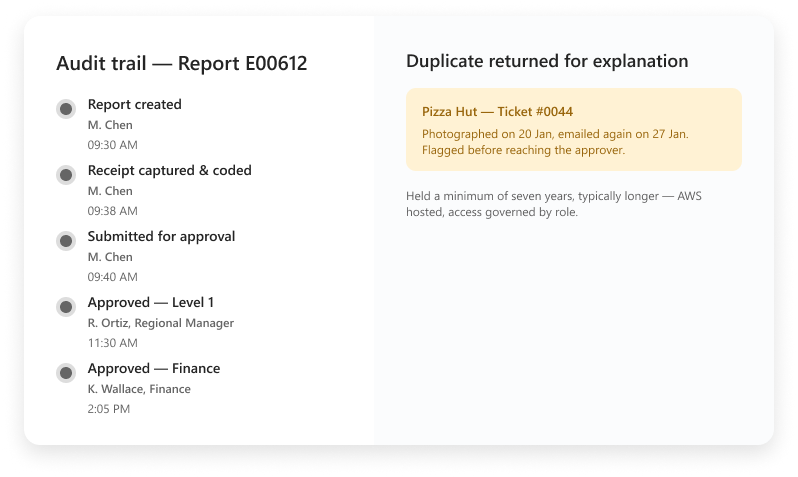
01 / AUDIT TRAIL
The audit trail carries the full approver chain
Every action on a report is timestamped: who created it, who coded it, who changed a line, who approved it and in what order.
The full approver chain sits on the report itself, so a reviewer opens one record instead of rebuilding a sequence from six inboxes. Routing follows your own structure, so a project report walks a different path than a departmental one and the trail shows it.
01
Created
→
02
Coded
→
03
Changed
→
04
Approved
EVERY RECEIPT, EVERY ENTRY PATH
A flagged match returns for context
Receipt
→
Duplicate flag
→
Submitter explanation
→
Attached record
02 / DUPLICATE REVIEW
Duplicates are returned to the submitter for an explanation
AI duplicate receipt detection runs on every receipt entering SutiExpense, whether it came through a phone camera, email to receipts@sutisoft.com, or a desktop scan.
When the system sees the same receipt twice, the item is flagged before it reaches an approver and returned to the submitter to explain. The explanation stays attached to the report.
03 / POLICY LOG
Policy is checked at submission and logged there
Per diem overage, disallowed categories such as alcohol, missing required receipts and role-based spending limits are evaluated at submission, and the result goes to submitter and approver at the same time.
CHECK 01
Per diem overage
CHECK 02
Disallowed categories
CHECK 03
Required receipts
CHECK 04
Role-based limits
A report cannot go through without a required receipt attached. Each check writes to the record, so the log shows the rule, the value that tripped it and what the approver did next.
MINIMUM RETENTION
7+ years
Receipts, coded reports, approvals and the trail stay together as one record.
HOSTING
AWS-hosted and included
ACCESS
Governed by role
04 / RETENTION
Retention
SutiExpense holds expense data for a minimum of seven years, and in practice longer. Receipts, the coded report, the approvals and the trail sit together as one record in the AWS-hosted environment SutiSoft runs, with hosting included in the price.
Access is governed by role, so an outside reviewer sees what you grant and nothing more.
YOUR QUESTIONS, ANSWERED
Frequently asked questions
Choose a question to see the answer.
NEXT IN THE FLOW
Next: Reports and analytics
Once the record is sound, the next question is what you read out of it.
GET A DEMO
See how teams manage expenses with SutiExpense.
See audit trails, policy checks and retained records working together in one expense workflow.

