

SUTIEXPENSE / TRAVEL
Travel booking integration
Your travelers book through an integrated agency and the itinerary lands in the expense report, instead of being retyped from a confirmation email.
Get a Demo →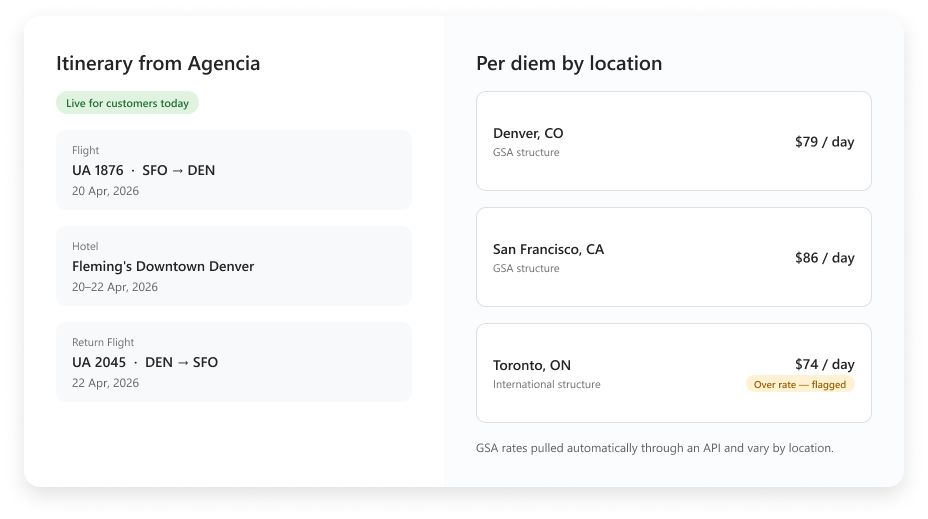
01 / BOOKING DATA
Itinerary data flows in from the booking
Travel booking provider data is integrated with SutiExpense. When a traveler books travel, itinerary data comes across and populates the expense submission, so flights, hotels and travel dates are in the report already.
01
Agency booking
→
02
Itinerary data
→
03
Expense report
LOCATION-BASED RATE STRUCTURES
The applicable schedule follows the traveler
GSA
Corporate
Custom
International
Different locations can carry different approved rates. Claims above the applicable rate are flagged at submission.
02 / PER DIEM
Per diem by location
SutiExpense supports GSA, corporate, custom and international per diem structures. GSA rates are pulled automatically through an API rather than maintained by hand, and they vary by location, so a night in Denver and a night in San Francisco are not treated the same.
You decide which structure applies to which group of travelers. A claim above the applicable rate is flagged at submission.
03 / POLICY CHECKS
Policy checked when the report is filed
ROLE AWARE
Role-based limits
Role-based spending limits are enforced at submission, set per role, so a field rep and a regional director are held to different numbers without a manager doing arithmetic.
CHECKED TOGETHER
Submission checks
Per diem overages, disallowed categories such as alcohol, and missing required receipts are flagged to the submitter and the approver at the same moment. A report cannot go through without a required receipt attached.
TIMESTAMPED
Full audit trail
Every action writes to a timestamped audit trail carrying the full approver chain.
YOUR QUESTIONS, ANSWERED
Frequently asked questions
Choose a question to see the answer.
NEXT IN THE FLOW
Next: Corporate card integration
Card transactions are the other half of every trip.
GET A DEMO
See how teams manage expenses with SutiExpense.
See booking data, per diem rules and policy checks working together in your travel expense workflow.

