

SUTIEXPENSE / REPORTING
Reports and analytics
More than 60 reports out of the box, dashboards by role, and drill-down from any total to the receipt behind it.
Get a Demo →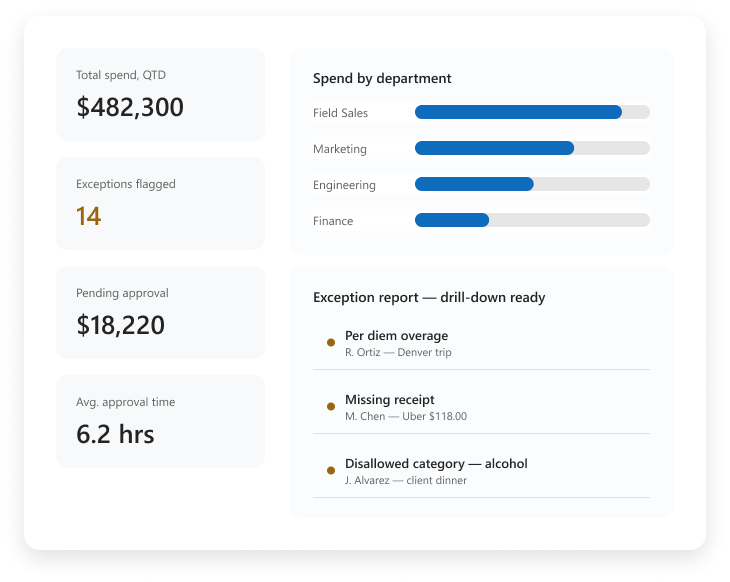
01 / BUILT-IN REPORTS
More than 60 built-in reports
Spend by department, by project, by cost center, by category, by submitter, by policy exception. Nobody has to specify a report before finance can answer a question.
You pick one, set the period and the dimensions, and read it. Reports group on the coding dimensions configured for your business, so the cuts match the way your chart of accounts is built.
Department
Project
Cost center
Category
Submitter
Policy exception
DRILL-DOWN PATH
Every total leads back to its source
Role dashboard
→
Total
→
Dimension
→
Report
→
Receipt
02 / DASHBOARDS
Dashboards by role, with drill-down
Dashboards are configurable by role, so a department head opens a different screen than your controller.
Totals are not dead ends. Click one and drill down through department, project and category to the individual expense report and the receipt behind it.
Budgets assigned by employee, role or department show actual spend against budget in real time.
03 / DELIVERY AND SEARCH
Scheduled delivery, filters and search
Scheduled report delivery sends the same report to the same people on the schedule you set. A weekly exception summary can go to each department head; a monthly spend roll-up can go to the CFO.
For questions outside a schedule, smart filters and advanced search narrow the data inside the application: every expense over a threshold, in one cost center, in one quarter; every report from a single submitter.
WEEKLY
Exception summary
Send to each department head.
MONTHLY
Spend roll-up
Send to the CFO.
ON DEMAND
Filters and search
Narrow by threshold, cost center, quarter or submitter.
04 / EXCEPTIONS
Exception and audit-ready reporting
Exception and policy violation reporting collects everything that broke a rule into one list: per diem overages, disallowed categories, missing receipts and amounts over a role-based limit. Your controller reviews a list rather than hunting for outliers across a period.
Per diem overages
Disallowed categories
Missing receipts
Role-based limits
Audit-ready reporting pulls those records with the approval trail attached.
YOUR QUESTIONS, ANSWERED
Frequently asked questions
Choose a question to see the answer.
NEXT IN THE FLOW
Next: Integrations
Your other systems hold the rest of the picture.
GET A DEMO
See how teams manage expenses with SutiExpense.
See dashboards, scheduled reports and audit-ready exceptions working together in one expense workflow.

