

SUTIEXPENSE / MOBILE
Mobile expense reporting
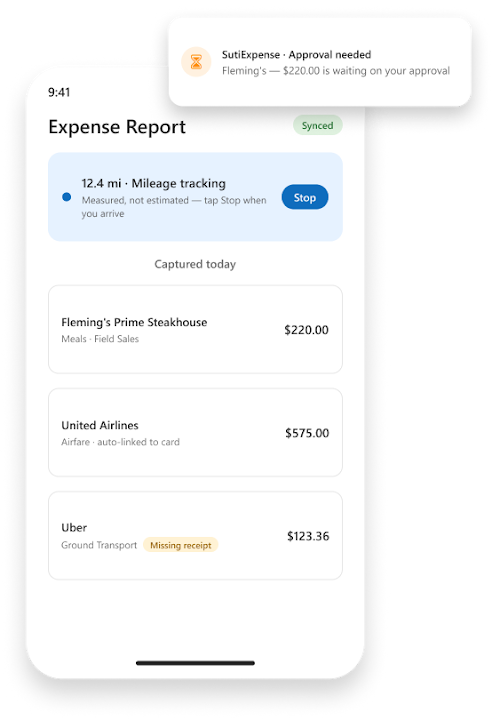
Your field and traveling people create, code, submit and approve expense reports on SutiExpense Mobile. Nothing waits for a laptop.
Get a Demo →

01 / CAPTURE
Capture a receipt in the app
A submitter opens the camera, captures the receipt, and extraction technology reads it and files the data to that person's repository. For most submitters that is the whole interaction.
When the transaction posts on your daily corporate card feed, the receipt links to it automatically, so line by line reconciliation against a statement is already done.
Photograph receipt
Extraction reads and files
Match card transaction
02 / APPROVAL
Approve from a push notification
Approvers get a push notification and approve in the app.
A report is ready
Review and approve in app
Two ways to keep moving
01 Offline report → Sync on reconnect
02 Start tracker → Drive → Stop
Illustrative workflow, not a product screen.
03 / OFFLINE & MILEAGE
Offline reports and GPS mileage
Report creation works offline and syncs when the phone reconnects.
Mileage is measured rather than estimated. The driver starts the tracker, drives, stops it, and SutiExpense calculates the trip.
04 / USER WORKFLOWS
Built for light users and full users
Photograph and finish
A light user photographs a receipt and stops there, because saved coding preferences for project codes, cost centers and departments pre-populate on capture.
Run the whole report
A full user creates, codes, submits and approves entire reports on the phone.
Both run on Android and iOS, and both get the full workflow rather than a cut-down viewer. Most SutiExpense customers keep desktop for finance and admin staff and put everyone else on the phone.
YOUR QUESTIONS, ANSWERED
Frequently asked questions
Choose a question to see the answer.
NEXT IN THE FLOW
Next: Travel booking integration
Once trips are captured on the phone, the next question is where the itinerary comes from.
GET A DEMO
See how teams manage expenses with SutiExpense.
See mobile receipt capture, approvals, offline reporting and mileage working together in your expense workflow.

