

SUTIEXPENSE / APPROVALS
Automated approval workflows
Every report routes to the right approver the moment it is submitted, with cover in place when that approver is away.
Get a Demo →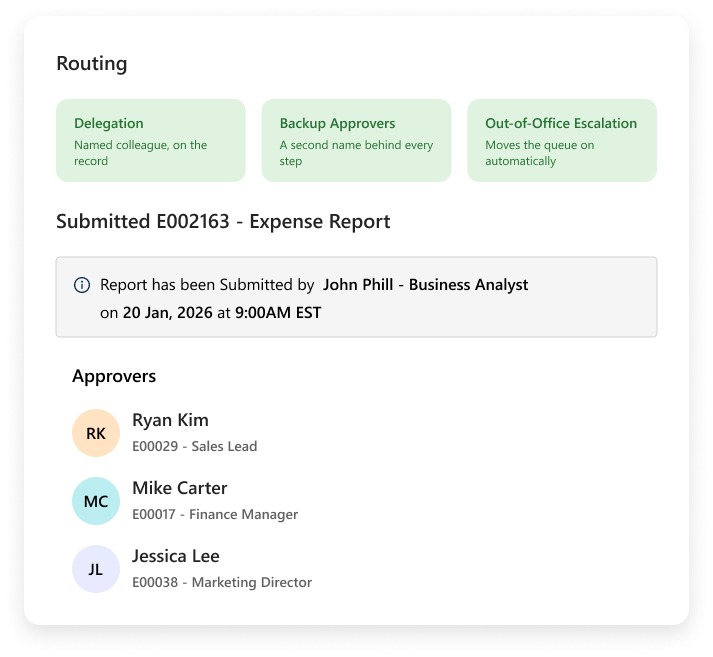
01 / ROUTING
Routing reads the report
A report coded to a project goes to that project's owner. A report from field sales climbs the sales chain.
Multi-level routing handles the ones needing a manager, then a department head, then finance, and role-based approval limits decide when an amount climbs further. Steps run in series where the order is the control, or in parallel where two owners need to look and neither should wait on the other.
AT A GLANCE
How the pieces connect
REPORT DATA
Project or department
Routing reads the coding already on the report.
APPROVAL LEVEL
Role and amount
Limits determine when a report climbs further.
PATH
Serial or parallel
Steps follow the control the business requires.
02 / APPROVER COVER
Cover when an approver is away
An approver can define an alternate approver for a defined period.
Backup approvers sit behind each step, so there is always a second name, and out-of-office escalation moves a queue on instead of letting it sit until someone returns.
Push notifications reach approvers on the phone, and the full workflow runs on the Android and iOS apps. The timestamped audit trail carries the full approver chain on the transaction.
AT A GLANCE
The complete operating model
COVER 01
Alternate approver
An approver can define an alternate approver for a defined period.
COVER 02
Backup approver
A second name sits behind each step.
COVER 03
Escalation
Out-of-office routing keeps the queue moving.
MOBILE
Push approval
The full approver chain remains on the record.
03 / SUBMISSION CONTROLS
Reports arrive complete
Policy runs at submission, before routing starts.
Per diem overages and disallowed categories such as alcohol are flagged to the submitter and the approver with the rule named. Where your policy requires a receipt, the report cannot be submitted without one. Role-based spending limits apply in the same moment.
AI duplicate receipt detection catches the same receipt twice before approval.
CONTROL VIEW
How the pieces connect
RECEIPTS
Required before routing
A required receipt must be attached before submission.
POLICY
Rule named
Overages, categories and spending limits are checked together.
DUPLICATES
Caught before approval
The same receipt submitted twice is flagged.
YOUR QUESTIONS, ANSWERED
Frequently asked questions
Choose a question to see the answer.
NEXT IN THE FLOW
Next: ACH reimbursement
Once a report is approved, the money still has to reach the employee.
GET A DEMO
See how teams manage expenses with SutiExpense.
See the complete expense workflow configured around your team.

