Implementing a new helpdesk system in your organization can be challenging, as not everyone adapts to change easily, even when the new software offers clear benefits.
Modern helpdesk solutions can significantly improve productivity, streamline support processes, and enhance overall team efficiency. To ensure a successful rollout and minimize potential disruptions, it is essential to have a clear, well-structured implementation plan.
This blog explains common helpdesk rollout challenges and how to overcome them effectively.
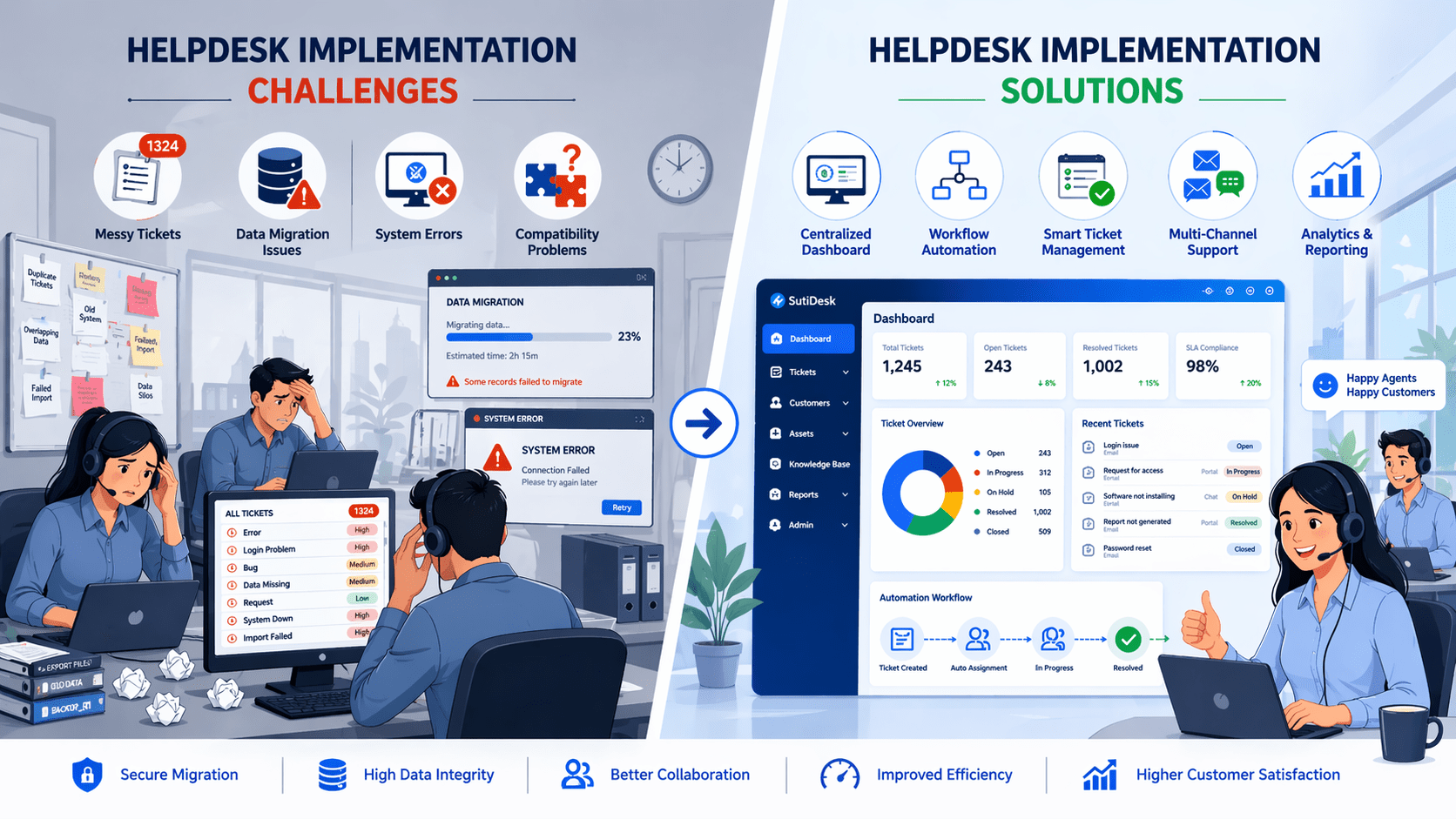
4 Common Helpdesk Rollout Concerns
Research indicates that nearly 50% of helpdesk deployments fail to deliver the desired results, primarily due to organizational unpreparedness. Replacing an outdated helpdesk system with a modern platform is not a simple transformation. Without proper planning, implementation issues can disrupt daily support operations, delay ticket resolution, and negatively impact the customer experience.
These are the four common challenges businesses usually face:
1. Staff Resistance
Introducing a new helpdesk system often meets resistance from staff who are accustomed to the previous platform.
2. System Compatibility
Another common challenge organizations face when implementing a helpdesk system is ensuring compatibility with existing software.
3. Data Migration
Migrating the existing customer database and support tickets to a new helpdesk system is one of the most challenging aspects of implementing it.
4. Data Integrity
For a modern helpdesk platform to function effectively, all customer information, ticket histories, and support interactions must be consolidated into a single, accessible database. However, many legacy systems store data across multiple silos, creating significant challenges during migration.
It is important to involve support specialists for expert guidance when facing complex challenges during helpdesk implementation. Leveraging expert assistance can accelerate issue resolution, minimize disruptions, and ensure the system is correctly configured and optimized.
5 Strategies to Overcome Software Implementation Obstacles
Being aware of where helpdesk implementations might go wrong can provide you with valuable insights to take appropriate action. Once these challenges are identified, organizations can focus on practical solutions to resolve them effectively.
Below are five approaches that can help overcome common software deployment challenges.
1. Ensuring Clear Communication and Documentation
When rolling out a new helpdesk system, consider these key steps to ensure smooth adoption and team alignment:
- Define Information Access: Clearly state which data and features each team will have access to and prioritize accordingly.
- Communicate Responsibilities: Properly outline each team’s duties before the implementation begins.
- Document Workflows: Create step-by-step instructions for system features to help agents understand them seamlessly.
- Use Visual Guides: Include screenshots or diagrams to simplify agent understanding and reduce errors.
- Promote Transparency: Maintain open communication across teams to foster collaboration and a cohesive implementation experience.
This structured approach ensures agents can adopt the helpdesk platform efficiently while minimizing confusion and operational disruptions.
2. Facilitating Safe and Accurate Data Migration
When migrating data to a new helpdesk platform, careful monitoring is essential to avoid errors and security risks:
- Assign a Dedicated Team: Have internal or external experts oversee the data transfer process to ensure accuracy.
- Maintain Data Security: Ensure all data is transferred securely during migration to prevent breaches or unauthorized access.
- Prevent Inefficiencies: Avoid moving outdated or incorrect information from the old system into the new helpdesk platform.
- Use Visualization Tools: Employ tools such as spreadsheets or project trackers to map data fields and understand how information flows into the new system.
- Monitor Throughout Migration: Continuously check for discrepancies or errors to ensure a smooth, efficient transfer.
Following these steps helps organizations protect sensitive information while ensuring the new helpdesk system operates effectively from day one.
3. Enabling Smooth Helpdesk Adoption Through Training
Adopting a new helpdesk system can be challenging for agents, especially if they are accustomed to existing software. To ensure a smooth transition, consider these strategies:
- Highlight Benefits: Clearly communicate how the new helpdesk platform improves the execution of regular tasks.
- Schedule Technical Training: Set aside dedicated sessions to teach agents how to use the system effectively.
- Engage Experts: Bring in experienced trainers to guide agents through the platform’s features.
- Develop an Onboarding Strategy: Prepare a clear onboarding plan before implementing the system. This helps employees understand how to use the helpdesk and ensures it fits smoothly into everyday work processes.
- Monitor Progress: Regularly evaluate agent proficiency and provide additional guidance if needed.
Implementing these steps helps agents embrace the new helpdesk system confidently and improve overall operational efficiency.
4. Balancing Helpdesk Adoption and Workflow Efficiency
Introducing a new helpdesk system can boost long-term productivity, but it may also disrupt existing workflows. To ensure a balance:
- Minimize Disruption: Design training carefully so agents don’t feel overburdened or perceive the training as additional work.
- Emphasize Hands-On Learning: Provide practical, interactive training sessions where agents learn through practice rather than solely through theory.
- Streamline Learning: Focus on methods that reduce training time while ensuring agents can continue completing their tasks efficiently.
- Document Processes Clearly: Create step-by-step guides for workflows and system features to help agents follow procedures accurately.
- Support Quick Adoption: By combining hands-on training with clear documentation, agents can become proficient faster and maintain productivity throughout the transition.
This approach ensures that agents confidently embrace the new helpdesk platform without sacrificing efficiency or service quality.
5. Maintaining Vendor Support for Helpdesk Success
Building a strong relationship with your helpdesk software provider after implementation is crucial for smooth operations. Key considerations include:
- Leverage Vendor Expertise: Providers have in-depth knowledge of the platform and can provide guidance on features, best practices, and troubleshooting.
- Address Post-Implementation Questions: After rollout, agents may have numerous queries or need clarifications that the software providers can address.
- Supplement Internal Teams: Vendor support acts as an extra resource to help resolve technical issues.
- Facilitate Continuous Improvement: Continuous vendor collaboration ensures that updates, optimizations, and system improvements are implemented effectively.
- Enhance Adoption and Efficiency: Seamless access to support from solution experts helps agents quickly overcome obstacles and fully utilize the helpdesk platform.
Leveraging vendor support ensures the helpdesk system remains effective, reduces internal workload, and boosts overall team productivity.
To ensure a smooth rollout of the helpdesk solution, it is essential to plan carefully, involve key stakeholders, and provide comprehensive helpdesk training. These steps reduce errors, improve adoption, and help organizations successfully overcome helpdesk rollout challenges.
Plan Your Helpdesk Implementation with SutiDesk
Starting early with a well-thought-out helpdesk implementation strategy is key to ensuring a successful rollout. While a helpdesk platform like SutiDesk offers powerful features to streamline support operations, leveraging its built-in capabilities can further enhance efficiency and service quality.
Benefits you can expect from SutiDesk:
- AI-Powered Chatbot Assistance: The AI chatbot can automatically respond to common customer queries, reducing response times and allowing support agents to focus on more complex issues.
- Smart Ticket Management: Automatically convert customer requests from multiple channels into support tickets and organize them with intelligent routing and prioritization.
- Multi-Channel Support: Manage customer interactions across email, chat, and other communication channels within a unified platform for faster, more consistent support.
- Workflow Automation: Automate repetitive support tasks such as ticket assignment, status updates, and follow-ups to improve operational efficiency.
- Analytics and Reporting: Built-in reports and performance dashboards help monitor team productivity, track response times, and continuously improve service delivery.
By leveraging these features, the support team can improve response times and deliver a better customer experience.
Final Thoughts
Implementing a new helpdesk platform is a crucial step toward improving the efficiency of customer support. Platforms like SutiDesk offer advanced features and automation capabilities that can transform your support operations, but these benefits are realized only when agents are confident and proficient with the system.
Leveraging SutiDesk’s intuitive features, along with comprehensive training, empowers agents to deliver faster, more accurate support and enhance customer satisfaction. A strategic, well-executed implementation creates the foundation for continuous success, productivity, and measurable ROI from your helpdesk investment.