Artificial Intelligence
SutiDAnalytics embeds AI at every level of the platform, from full dataset analysis to chart-level insights to conversational data exploration and forward-looking predictions. You do not need a data scientist to get meaningful answers from your data.
| What the AI Does | Business Value |
|---|---|
| Analyses your full dataset and returns statistical insights | No manual pivot-building. AI surfaces what matters first |
| Examines each chart’s underlying data for patterns | Every chart tells a story. AI writes the caption for you |
| Projects future values with confidence intervals on charts | Budget and plan with AI forecasts, not spreadsheet guesswork |
| Answers plain-English questions with charts and tables | Any team member can explore data. No SQL, no training needed |
AUTO ANALYTICS (REPORT LEVEL)
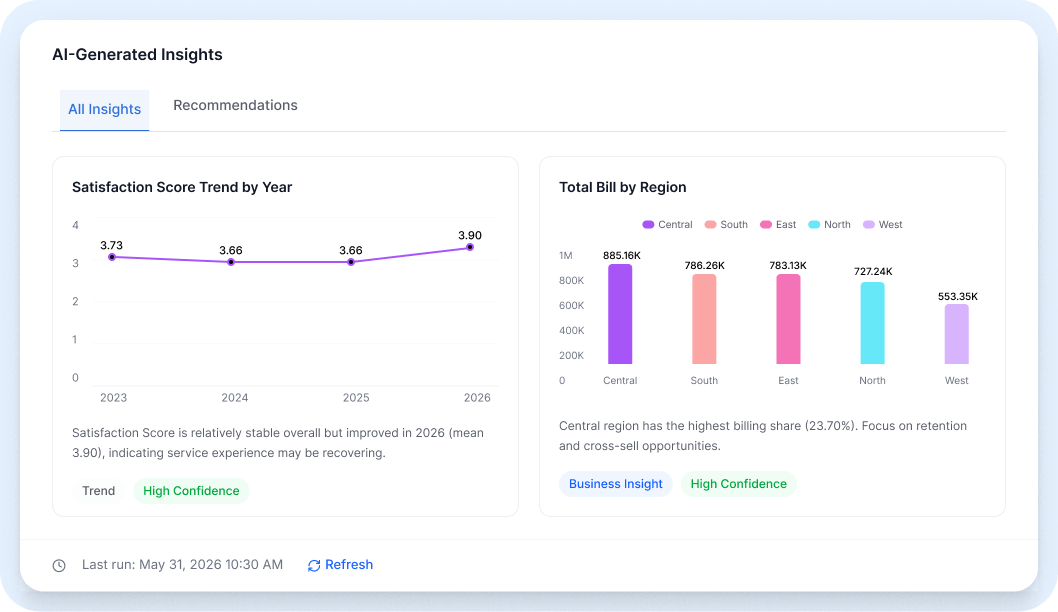
Auto Analytics at the report level runs AI analysis across your entire dataset in seconds. Select an AI model, click Run Analytics, and receive a structured output covering statistical summaries, automatically generated chart recommendations, identified patterns, and actionable business recommendations, all grounded in your actual data.
Multiple analytics runs can be saved and compared side by side, letting you track how insights evolve as your data changes over time. No manual chart building, no pivot guesswork. AI surfaces what matters most, first.
AI model selection for analysis
Statistical summaries across all columns
Auto-generated chart visualizations
Business recommendations from data patterns
Side-by-side comparison of multiple analytics runs
Best For: Initial data exploration on new datasets, executive briefings, identifying which visualizations to build, monthly business reviews.
AUTO ANALYTICS (VISUAL REPORT LEVEL)
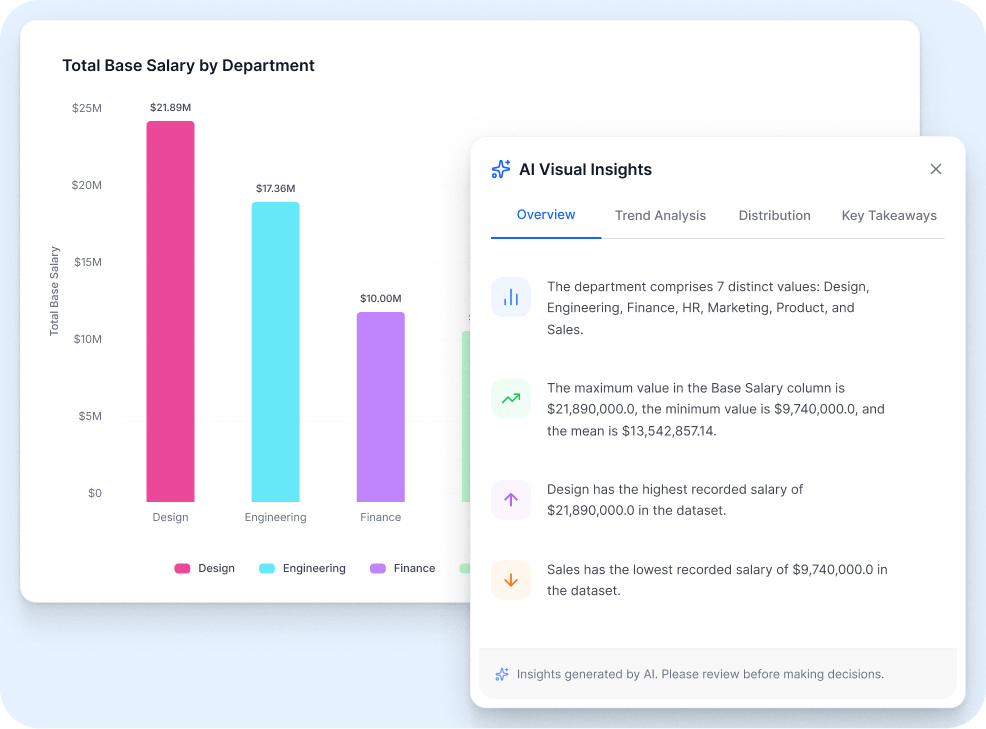
While report-level analytics covers the full dataset, visual-level Auto Analytics examines the data behind each individual chart, generating context-aware insights specific to what that chart is showing.
Line charts receive trend direction commentary, identifying upward momentum, plateaus, or declining patterns. Bar charts receive distribution analysis, highlighting which categories dominate and which underperform. Pie and donut charts reveal which segments are most significant and whether the distribution is concentrated or spread. Every chart in your dashboard gets its own AI-generated narrative.
Per-chart AI analysis
Trend identification for line and area charts
Distribution commentary for bar charts
Segment dominance analysis for pie and donut charts
Plain-English chart narratives
Best For: Adding context to shared dashboards, generating chart captions for reports, helping non-analysts understand what a visualization means.
AI PREDICTIONS
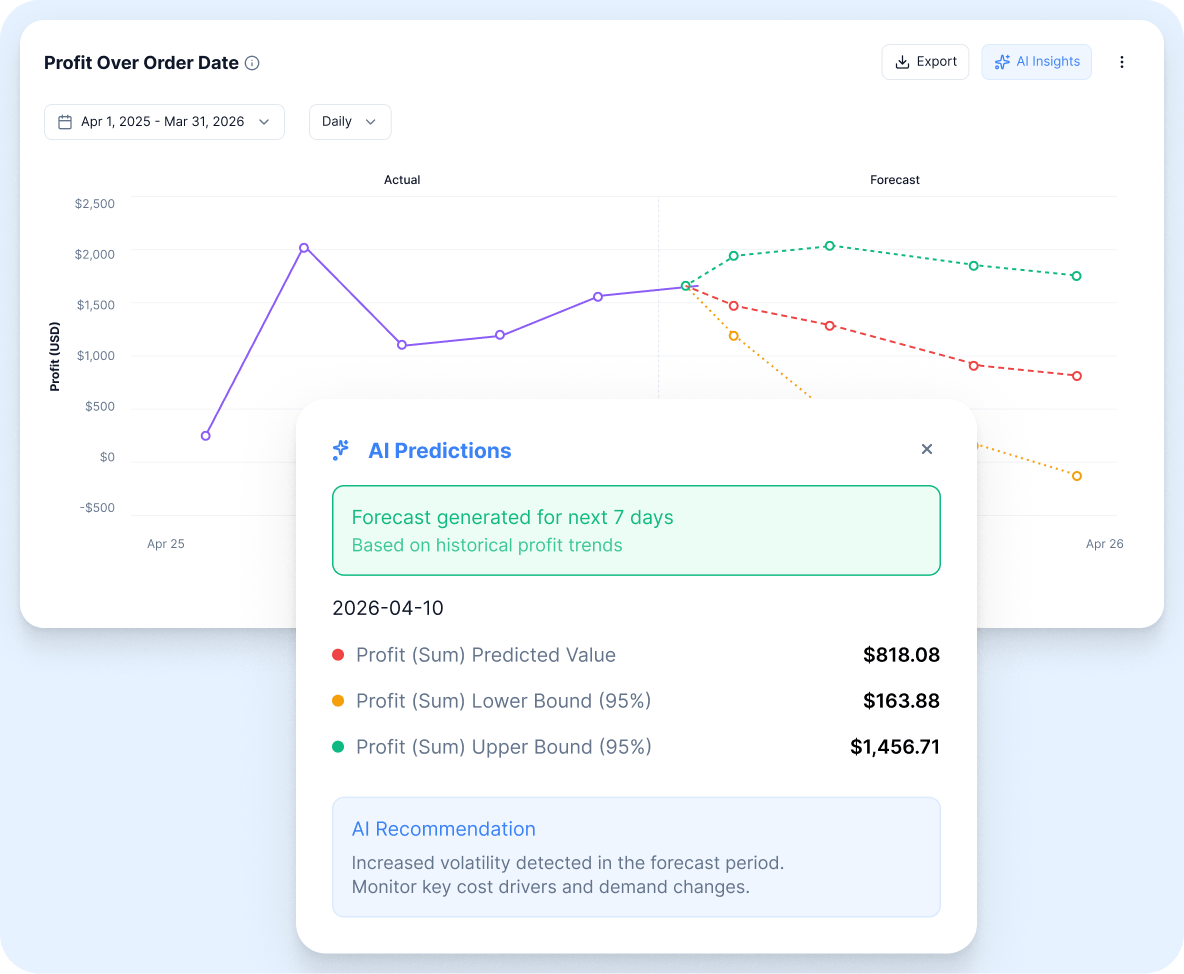
SutiDAnalytics does not just show what has happened. It projects what is likely to happen next. Visualization Predictions uses AI forecasting models to extend any time-series chart into the future, overlaying projected values and confidence interval bands directly on the chart canvas.
The confidence interval bands give your team a realistic range of expected outcomes, not just a single projected line, so you can plan for both optimistic and conservative scenarios. No data science expertise required. Connect your historical data, enable predictions, and the model runs automatically.
AI forecasting on any time-series chart
Confidence interval bands showing range of outcomes
Works on line, area, and bar charts with a date axis
Useful for revenue, demand, user growth, and risk forecasting
No model configuration or data science skills needed
Best For: Finance teams building budget forecasts, operations teams planning capacity, sales teams projecting pipeline, product teams forecasting user growth.
AI CHATBOT
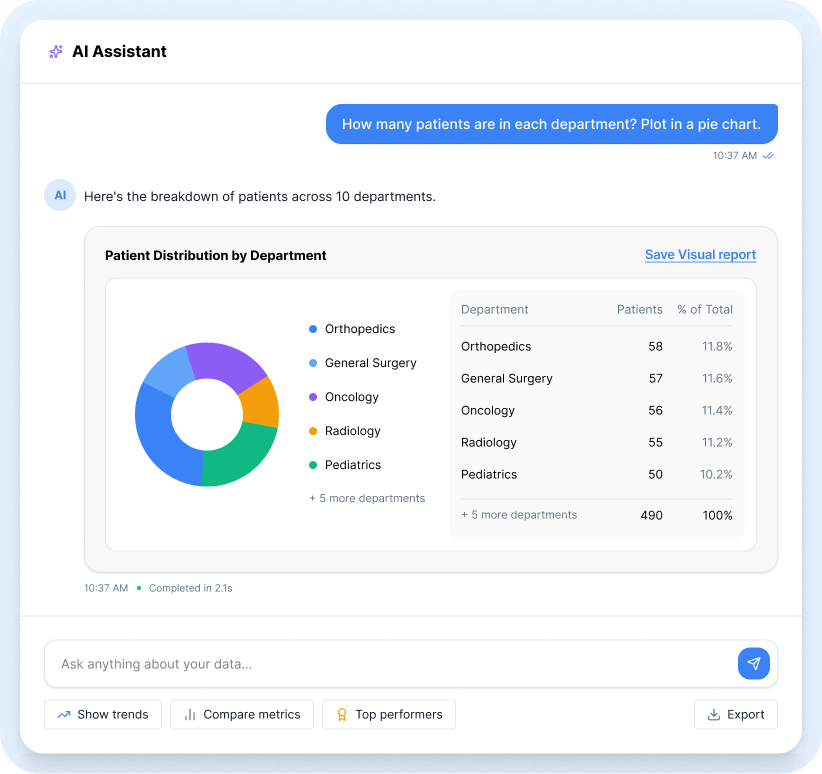
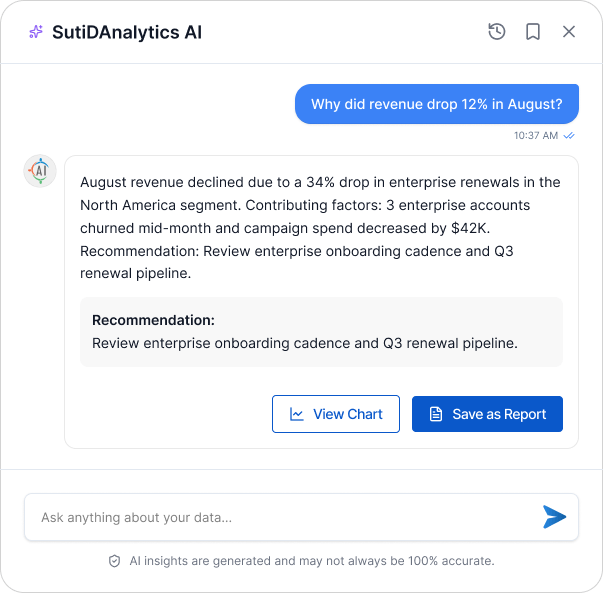
The SutiDAnalytics AI ChatBot turns data exploration into a conversation. Type any question in plain English and receive a conversational response with readable analysis, interactive charts, and sortable data tables inline in the chat window.
The ChatBot understands your column names, data schema, and business context automatically, with no setup or training required. Follow-up questions maintain context from the previous exchange, so you can drill deeper without starting over. Any AI-generated chart can be saved as a Visual Report with a single click and added to any dashboard immediately.
Plain English question input
Inline chart and data table responses
Context-aware follow-up questions
Save AI-generated charts as Visual Reports
No SQL or technical knowledge required
Accessible to every team member
Best For: Business users exploring data without analyst support, executives asking ad-hoc questions, product teams investigating specific metrics, anyone who needs an answer faster than a dashboard can be built.
Here is what it looks like when you ask SutiDAnalytics a question:
AI Analytics in Action
Finance Ask:
Which product line had the highest margin variance in Q2?
AI returns a sorted bar chart with statistical commentary and a data table.
Healthcare Ask:
Which departments exceeded bed capacity in March?
AI returns a line chart with daily capacity data drilled to department level.
Retail Ask:
Show top 5 SKUs by return rate last quarter?
AI returns a ranked table with an inline donut chart and recommended action.
SaaS Ask:
What is the churn trend over the last 12 months?
AI returns a trend line with predictive overlay and confidence bands for the next 3 months.
No model training. No data science team. No configuration. SutiDAnalytics AI connects to your data and starts generating insights immediately.
Build your first interactive dashboard today. Drag, drop, and share in minutes.
©
SutiSoft, Inc. All Rights Reserved
By clicking “Accept,” you agree that we may use cookies to enhance site functionality, understand usage patterns, and deliver relevant marketing content. Not providing or withdrawing consent may limit certain features or affect site functionality.