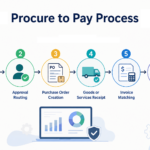

Your procurement team is not slow. The process is. Requisitions arrive through emails, spreadsheets, and verbal requests. Someone re-enters the information into a form. Approvals stall when a manager is traveling. The purchase order is created days later. The invoice arrives weeks after that, and the AP team has to match it manually against a purchase order they have to find in another system. By the time the supplier is paid, the process has involved multiple people and plenty of manual follow-up.
Every manual step creates another opportunity for errors, delays, or missed spending. Procure-to-pay automation is not about replacing people. It is about removing repetitive data entry, follow-up emails, manual reconciliation, and unexpected budget issues from the process.
Automate Requisition Intake via Catalog and Guided Forms
Procurement teams spend hours every week re-entering requisition data that employees have already provided because the request started as an email or spreadsheet. An employee describes what they need, and procurement has to turn that request into a requisition. The buyer then reviews the details, adds the required information, and sends it for approval.
Automating requisition intake replaces that manual loop with a catalog or guided form. The requester selects from approved products and services or enters the required information through a simple form. Required details can be filled in automatically, helping the requisition reach procurement complete and ready for review.
This means procurement can focus on reviewing and managing the request instead of rebuilding it from an email thread.
Punchout functionality can take this a step further. A requester can click a link inside the procurement system, shop on an approved vendor’s website such as Amazon, add items to a cart, and check out. The selected items are then transferred back into the procurement system, reducing the need to manually enter each line item.
Rule-Based Approval Routing Removes Procurement From the Follow-Up Loop
Approval workflows can slow down when an approver is unavailable. A requisition sits in an inbox, the requester contacts procurement for an update, and procurement has to follow up with the approver. A simple approval delay can quickly become another manual task for the procurement team.
Automated approval routing removes much of that follow-up. The system can send requisitions to the right approver based on factors such as department, role, or spending limit. If an approver is unavailable, the workflow can escalate the request to a backup approver or manager according to predefined rules.
Requesters can also check the status of their requests without sending emails to procurement. This keeps approvals moving while allowing procurement teams to spend less time tracking down approvals.
Three-Way Matching Automates Reconciliation and Closes the Audit Gap
When an invoice arrives, someone has to verify it against the purchase order and the receipt before AP can process payment. In a manual workflow, that is three documents in three places. AP pulls the PO from procurement’s system, confirms the goods were received by checking with the warehouse or the requester, checks the invoice line items and amounts, and reconciles any discrepancies before coding it to the GL.
That reconciliation step delays the AP close cycle and creates audit exposure every time a mismatch goes unnoticed until month-end.
Three-way matching automates this check by comparing the purchase order, goods receipt, and supplier invoice. When the information matches within the company’s rules, the invoice can move through processing without requiring manual review. When something does not match, the system flags the invoice for attention.
This allows AP teams to focus on exceptions instead of checking every invoice manually. It also creates a clearer record of the transaction from purchase through payment, which can make audits and dispute resolution easier.
Real-Time Budget Tracking Flags Overruns Before Commitment
Budget overruns discovered at month-end were visible the entire time. The gap is not spending discipline. It is monitoring. In a manual or semi-manual procurement process, committed spend exists in requisitions and purchase orders that have not hit the GL yet, so your budget-versus-actual report at month-end only shows what has already been paid, not what has already been committed.
By the time you see the overrun, the money is gone.
Real-time budget tracking changes that by giving teams visibility into budgets, committed spending, and actual spending as purchases move through the process. A budget check can happen when a requisition is submitted or approved, rather than waiting until the invoice is paid.
Department managers and finance teams can see how much of their budget has been requested, committed, and spent. That gives them an opportunity to review spending while there is still time to make a decision.
Shared Data between Procurement and AP Closes the Reconciliation Gap
Procurement and AP live in different systems at most mid-market companies. Procurement cuts a PO in one platform. AP receives the invoice in another. Someone reconciles the two manually, and that reconciliation step is where discrepancies hide until an audit or a vendor dispute surfaces them.
Procure-to-pay automation connects procurement and accounts payable so both teams can work with the same information. Purchase order and receipt data can flow from procurement to AP automatically. When an invoice arrives, AP can match it against information already in the system instead of searching another platform or asking procurement to confirm the details. This keeps the approval and payment history connected from the initial requisition through payment, reducing manual reconciliation and the risk of missing or inconsistent information.
Implementation Is Faster Than Enterprise-Tier Platforms
Implementation time matters for mid-market companies that cannot afford a long disruption to their purchasing or finance operations. SutiProcure can typically be implemented in two to four weeks, compared with four to twelve or more weeks for some enterprise-tier procurement platforms. This shorter timeline is possible because SutiProcure is designed around the needs and organizational structures of mid-market businesses, without requiring the level of configuration that larger enterprise systems may require. That timeline matters when you cannot afford to disrupt an active budget cycle or financial close.
The goal is not simply to have more features. It is to have the workflows, approvals, and integrations your business needs without unnecessary complexity.
Larger enterprise procurement systems may require more configuration to support complex approval structures, coding requirements, and workflow variations. For mid-market businesses, a simpler approach to configuration can help reduce setup time and make it easier for teams to start using the system. This can help organizations move from implementation to everyday use more quickly.
Make Procure-to-Pay More Efficient with SutiProcure
Procure-to-pay automation can remove many of the repetitive tasks that slow purchasing and payment processes down. From requisition intake and approvals to purchase orders, invoice matching, and budget tracking, automation helps procurement and finance teams keep the process moving with less manual work.

See how teams automate procure-to-pay with SutiProcure.
FAQs
SutiProcure is designed for mid-market organizations across industries such as manufacturing, healthcare, financial services, retail, real estate, technology, and professional services.
Yes. SutiProcure can integrate with business systems such as NetSuite, Sage, QuickBooks, and Microsoft Dynamics to help connect procurement with existing financial processes.
SutiProcure can typically be implemented within two to four weeks, depending on the organization’s requirements, integrations, and workflow setup.
SutiProcure provides a guided purchasing experience that can make it easier for employees to submit and manage purchase requests without needing extensive procurement knowledge.
SutiProcure provides ongoing support to help teams use the system effectively, manage workflows, and address questions as procurement processes evolve.