Purchase orders sit at the center of the procure-to-pay workflow. They are the formal record of what you’ve committed to buy before the vendor ships, the invoice arrives, and the payment goes out. For mid-market finance and procurement teams, purchase order management is the difference between knowing what you’ve committed in real time and discovering budget overruns after the fact.
Purchase order management is the process of creating, approving, issuing, tracking, and managing purchase orders from the moment a need is identified through final payment. A well-structured PO process prevents maverick spend, gives finance visibility into committed dollars before invoices arrive, and enables automated invoice matching downstream in accounts payable. Without it, procurement decisions happen in email threads, approvals stall in inboxes, and the invoice that lands on your desk two months later is the first time finance learns the money was committed.
This blog explains how purchase order management works in a modern mid-market organization, why it matters to both procurement and finance, and how a structured process controls spend before it becomes a close-cycle surprise.
What Is a Purchase Order?
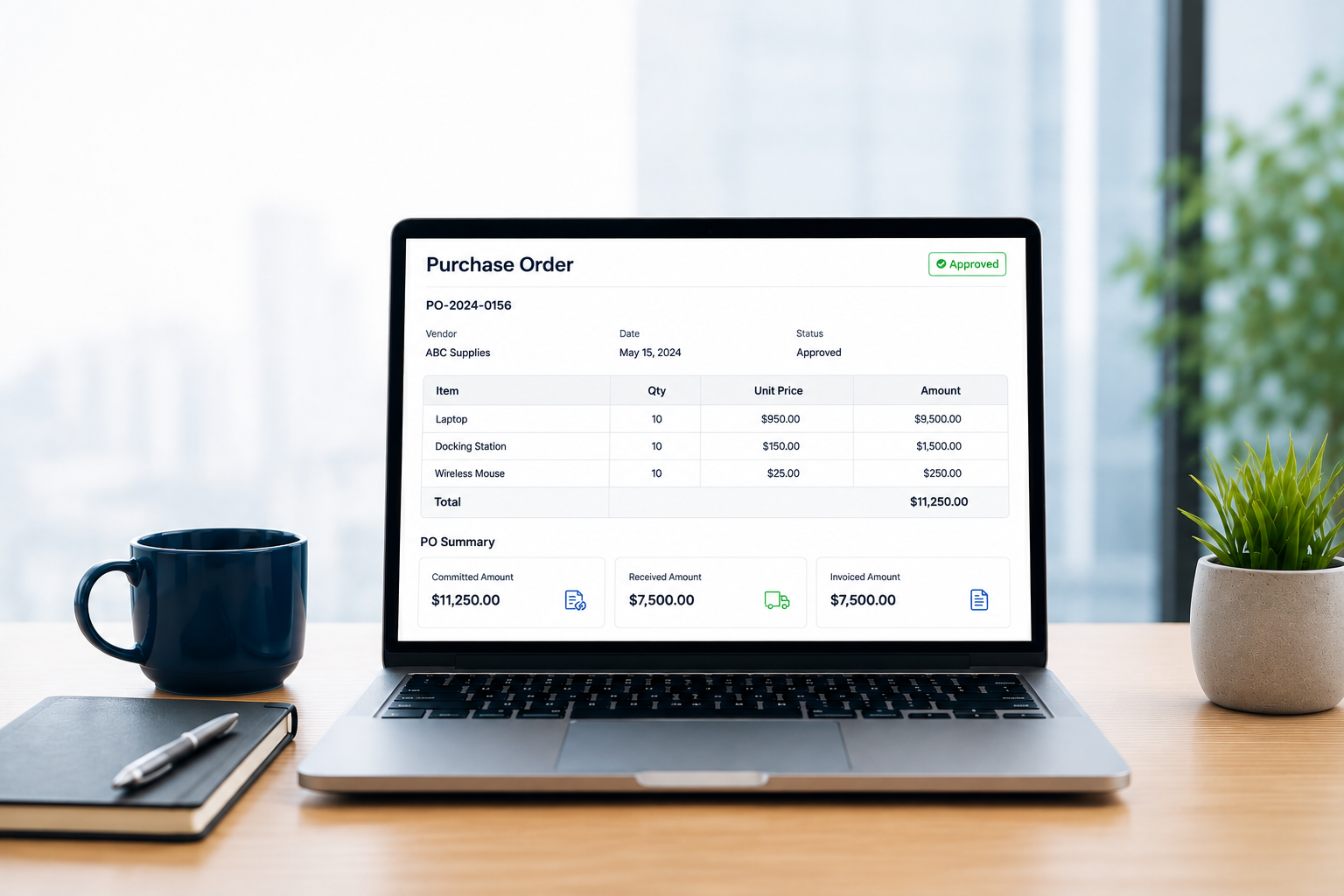
A purchase order is a formal, legally binding commitment to buy goods or services at a specified price, quantity, and delivery date. It becomes a contract when the vendor accepts it. Before that acceptance, the PO is your organization’s offer. After acceptance, it is the enforceable agreement governing the transaction.
Purchase orders serve three critical functions in the procure-to-pay cycle. First, they document the buyer’s commitment in writing, creating a record of what was promised before the vendor ships or invoices. Second, they provide the data foundation for three-way and N-way matching in accounts payable, where the PO, the goods receipt, and the invoice are reconciled automatically. Third, they give finance real-time visibility into committed spend, which is money obligated but not yet invoiced or paid.
A purchase requisition, by contrast, is an internal request for a purchase. Once approved, that requisition becomes a purchase order issued to the vendor. The requisition is the ask. The PO is the commitment.
How Purchase Order Management Works
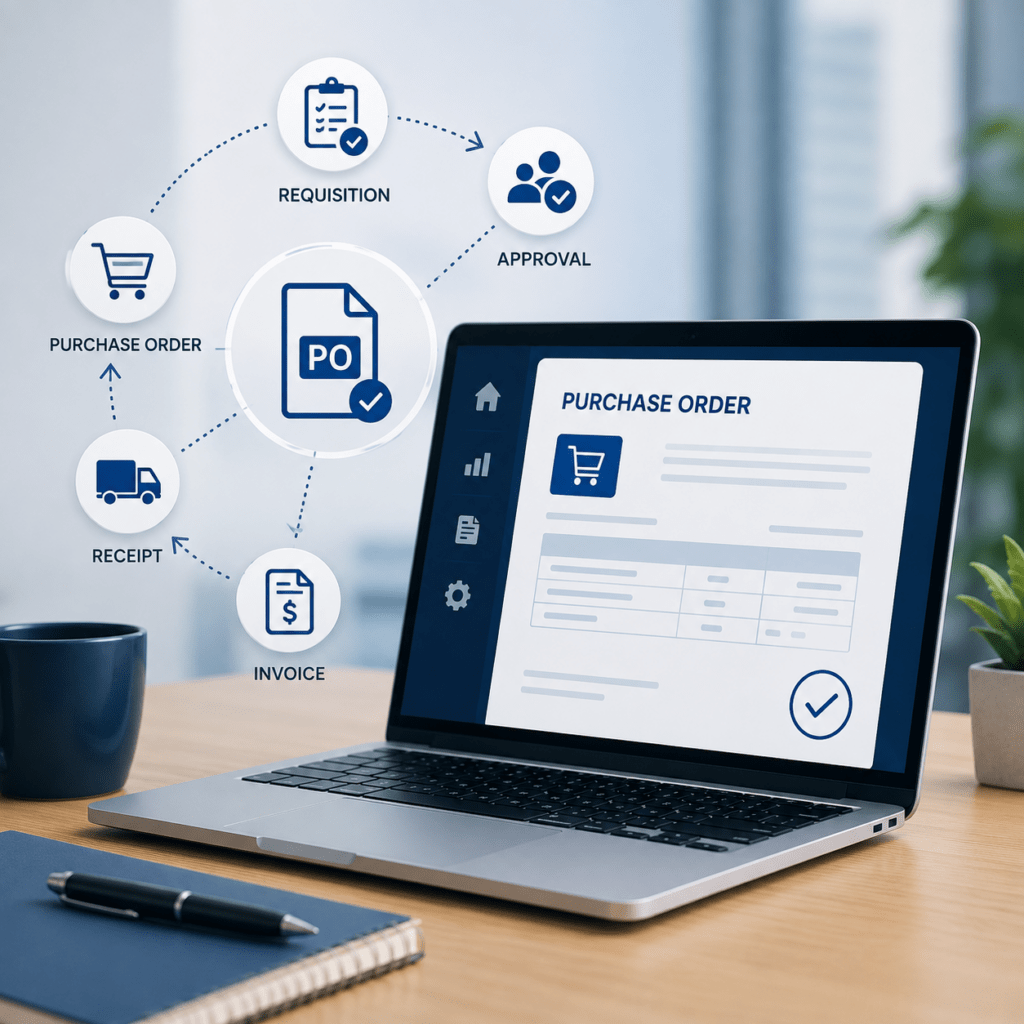
Purchase order management begins with a requisition. A department head or budget owner identifies a need and submits a purchase request, either through a procurement system, a catalog of pre-approved items, or a custom requisition form. That request includes what is being purchased, the quantity, the estimated cost, and the business justification.
Once submitted, the requisition enters an approval workflow. Approval routing in a modern PO system should be configurable by vendor, role, amount threshold, department, or cost center, in serial or parallel flows. A $500 office-supply request might route directly to a manager for approval. A $50,000 software purchase might require sign-off from the department head, procurement, and the CFO in sequence. The system handles the routing automatically based on the rules the organization has configured.
After approval, procurement converts the requisition into a purchase order and issues it to the vendor. The vendor reviews the PO, accepts it, and fulfills the order. When the goods or services are received, the receiving team logs the receipt in the system. That receipt record, combined with the original PO, creates the data set accounts payable will use to match the vendor’s invoice when it arrives. If the invoice matches the PO and the receipt, payment processing can proceed automatically. If it does not, the discrepancy surfaces as an exception for manual review.
Throughout this process, finance has visibility into committed spend. The moment the PO is issued, the budgeted amount is encumbered in the system, even though no invoice has been received and no payment has been made. That visibility is what prevents the budget surprise that mid-market companies without purchase orders often face: discovering at month-end that the money is already committed, with no time left to adjust.
Why Purchase Order Management Matters to Finance and Procurement
For procurement teams, purchase orders are the mechanism that turns informal buying into structured purchasing. Vendor RFQ (request for quote) processes allow procurement to compare pricing from multiple suppliers before issuing a purchase order, helping ensure competitive pricing and vendor accountability. Catalog-based purchasing guides requesters toward pre-approved items and preferred vendors, reducing the need for procurement teams to manually source every request. These processes work most effectively when the purchase order is the required output that formalizes the purchasing commitment and triggers downstream workflows.
For finance teams, purchase orders provide visibility into committed spend before an invoice arrives. Without them, the first indication of an upcoming cash outflow may be the invoice itself. By that point, the vendor may have already shipped the goods or delivered the service, leaving finance with little opportunity to adjust the budget or question the purchase.
PO management also helps prevent maverick spend by requiring purchases to follow a structured approval process before a commitment is made. Maverick spend occurs when employees purchase outside approved channels, suppliers, or purchasing policies. It can result in unexpected invoices, inconsistent pricing, and purchases that were never properly authorized. Making the purchase order a required step between the request and the commitment helps organizations maintain greater control over purchasing activity. Together, these controls give procurement teams greater control over purchasing while giving finance teams earlier visibility into financial commitments. The result is a more predictable procurement process, stronger spend control, and fewer surprises during financial close.
Best Practices for Purchase Order Management
Require purchase orders for all purchases above a minimum threshold. Setting a dollar floor (commonly $500 to $1,000) keeps small, routine purchases fast while ensuring larger commitments go through the formal process. Below that floor, use corporate cards with spend controls. Above it, require a PO.
Configure approval workflows to match your organizational structure. One-size-fits-all approval chains create bottlenecks. A modern PO system should route approvals based on the specific attributes of the purchase: the vendor, the dollar amount, the department, the cost center, or the type of goods or services being purchased. Serial approval (one person, then the next) works for high-value purchases that need multiple sign-offs. Parallel approval (all approvers notified at once, anyone can approve) works for routine purchases where any manager with budget authority can act.
Use catalog-based purchasing for frequently ordered items. If your team orders the same office supplies, IT equipment, or maintenance services regularly, build a catalog of pre-approved items with negotiated pricing and preferred vendors. Requesters can select from the catalog without needing procurement to source every order. Procurement still controls the vendor relationships and pricing. Requesters get faster turnaround.
Integrate purchase orders with accounts payable. The PO data you capture in procurement is the data accounts payable needs to match invoices automatically. SutiProcure creates purchase orders that integrate directly with SutiAP for automated invoice matching and payment processing. The requisition, the PO, the receipt, and the invoice become a single, connected workflow rather than four disconnected steps that require manual reconciliation.
Track committed spend in real time. A purchase order represents committed budget the moment it is issued, even though no invoice has arrived and no payment has been made. Finance should be able to see committed spend at any point in the budget cycle, not just actual spend after invoices have been paid. That visibility is what allows finance to manage cash flow proactively rather than reactively.
Next Steps
If your organization does not currently use purchase orders, or if your PO process relies on spreadsheets and email approvals, the first step is to audit your current procurement workflow. Identify where requests are submitted, how approvals happen, and whether finance has visibility into committed spend before invoices arrive. That audit will surface the gaps a structured PO process can close.
For organizations ready to move from manual or ad-hoc procurement to intelligent purchase order management, the next step is to evaluate procurement software that handles requisitions, approvals, PO creation, and integration with accounts payable in a single platform. SutiProcure is built for mid-market procurement and finance teams who need a system that adapts to their approval structure, integrates with their ERP, and connects directly to SutiAP for automated invoice matching downstream.
Want better control over purchase orders?
See how SutiProcure simplifies procurement with intelligent automation.
FAQs
A purchase order typically includes the supplier, items or services, quantities, prices, delivery details, payment terms, and applicable tax or shipping information.
Material changes should follow a controlled approval process and maintain an audit trail so the organization can track who changed the PO, what changed, and why.
Useful metrics include PO cycle time, approval time, invoice exception rate, PO compliance, open PO value, and the percentage of purchases made through approved channels.
The system should record the partial receipt against the PO, maintain the remaining open quantity or value, and allow subsequent deliveries and invoices to be matched correctly.
A PO should generally be closed when all goods or services have been received, invoices have been processed, and no further purchases are expected against the order.