

SUTIEXPENSE / CAPTURE
Automatic receipt capture
Receipts come in by phone, email or scanner. SutiExpense reads them, codes them, and checks them against your policy before anyone approves anything.
Get a Demo →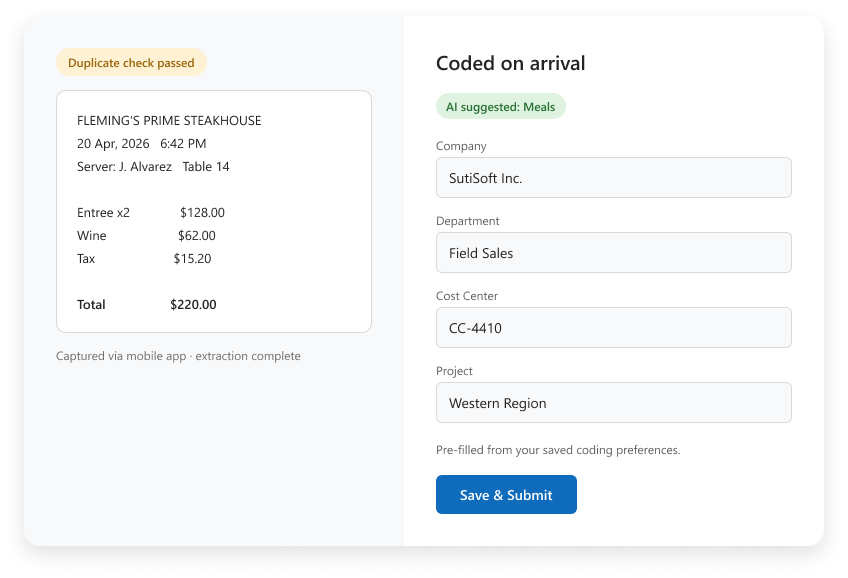
01 / CAPTURE
Three ways a receipt gets in
01
MOBILE CAMERA
Photograph it in the SutiExpense mobile app.
02
REGISTERED EMAIL
Email it to receipts@sutisoft.com.
Employees can register personal addresses as well as work ones, and SutiExpense matches the sender to the account.
03
DESKTOP SCAN
Scan and upload it from a desktop.
All three run the same extraction technology into the same repository, so a scanned receipt behaves the same as a photographed one.
02 / AUTOMATIC CODING
The data is read and coded on arrival
SutiSoft’s extraction technology reads the receipt and stores the data in that user’s repository. Coding is already filled in.
SutiExpense saves each person’s coding preferences at user level for project codes, cost centers and departments, and applies them to the capture. Available dimensions are company, department, cost center, location, project and class. Category suggestions draw on how that person’s spend was coded before.
When a corporate card transaction arrives on the daily bank feed, the matching receipt links to it automatically.
CAPTURED RECEIPT
Read by extraction technology
↓
CODING DIMENSIONS
Your business, your account structure
01 Company
02 Department
03 Cost center
04 Location
05 Project
06 Class
Saved coding preferences applied at user level.
↓
DAILY BANK FEED
Receipt + card transaction
Linked when the matching transaction arrives.
03 / POLICY CHECKS
Duplicates and missing receipts are caught at submission
01
FLAGGED FOR REVIEW
Duplicate detection
AI duplicate receipt detection flags a receipt submitted twice, including one photographed on the day and emailed a week later.
02
REQUIRED TO SUBMIT
Required receipts
Where your policy requires a receipt, the report cannot be submitted without one.
03
VISIBLE TO BOTH
Policy checks
Per diem overages and disallowed categories are flagged to the submitter and the approver at the same time.
YOUR QUESTIONS, ANSWERED
Frequently asked questions
Choose a question to see the answer.
02
NEXT / 13 FEATURES
NEXT IN THE FLOW
Mobile expense reporting
Capture is where the report starts, and for most submitters it starts on a phone.
Explore mobile expense reporting ↗GET A DEMO
See how teams manage expenses with SutiExpense.
See receipt capture, automatic coding and policy checks working together in your expense workflow.
Get a Demo →
