

SUTIEXPENSE / TAX RULES
Tax rules
Tax is calculated on each line as the expense is entered, using rules your administrators define for the places you operate.
Get a Demo →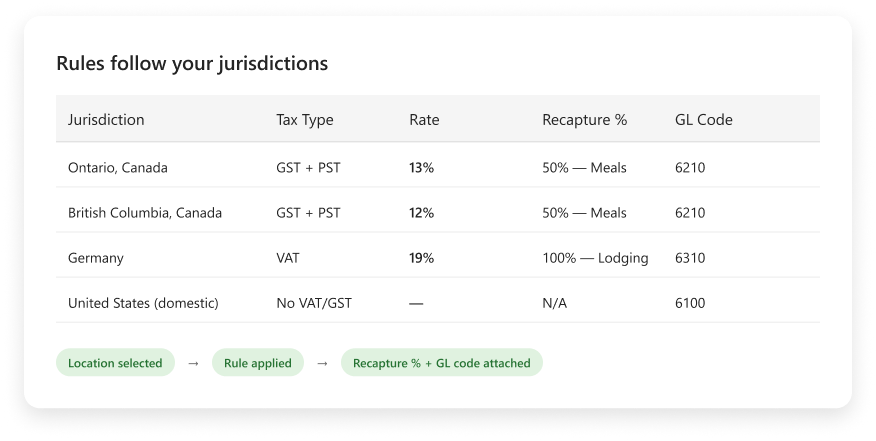
01 / JURISDICTIONS
Rules follow your jurisdictions
Tax rules are location-driven and defined per customer. Your administrators set the rates that apply where you operate, province by province or country by country, including structures such as Canadian GST, PST and VAT.
There is no pre-loaded global rate table. Rates move and treatments differ by entity, so your finance team owns the rule set and can point to it when someone asks why a line was treated the way it was.
CUSTOMER-DEFINED RULE SET
Configured for the places you operate
SCOPE 01
Province
SCOPE 02
Country
TAX TYPE
GST
TAX TYPE
PST
TAX TYPE
VAT
CONTROL
Finance-owned rates
02 / RECAPTURE
Recapture per expense category
A recapture percentage and a GL code can be associated to each expense category, so meals carry their own recapture formula while other categories carry theirs.
A restaurant receipt and a hotel receipt from the same trip are treated differently without anyone intervening, and each posts against the GL code your controller chose for it.
CATEGORY TREATMENT
Each category carries its own rule
INPUT
Expense category
CALCULATION
Recapture percentage
OUTPUT
GL code
03 / CALCULATION
Calculated at entry
Calculation happens once the location of the expense is known. The submitter selects where it took place, or SutiExpense infers it from the extracted receipt, and the applicable rule fires from there.
For the person filing the report this is invisible. For your finance lead it means the treatment is attached to the line at capture, when the receipt data is fresh, rather than inferred from an image three months later.
LINE-LEVEL FLOW
Location selects the applicable rule
STEP 01
Location known
STEP 02
Receipt read
STEP 03
Rule selected
STEP 04
Line calculated
04 / REPORTING
Reporting on recoverable tax
Because the rate, the recapture percentage and the GL code are applied per line as expenses arrive, your quarterly position is an output of the system rather than a reconstruction.
Reporting is built in, with 60-plus reports out of the box including drill-down and exception reporting, and every approval carries a timestamped audit trail with the full approver chain.
AUDITABLE OUTPUT
From line treatment to reporting
LINE DATA
Rate, recapture and GL
REPORTING
60-plus built-in reports
EVIDENCE
Timestamped approval trail
YOUR QUESTIONS, ANSWERED
Frequently asked questions
Choose a question to see the answer.
NEXT IN THE FLOW
Next: Budget controls and spending limits
Tax tells you what a line really costs. The next question is whether it sat inside its budget.
GET A DEMO
See how teams manage expenses with SutiExpense.
See location rules, category recapture and recoverable-tax reporting working together in one expense workflow.

