

SUTIEXPENSE / BUDGET CONTROLS
Budget controls and spending limits
Managers watch actual spend against budget in real time, and role-based limits are enforced when a report is submitted.
Get a Demo →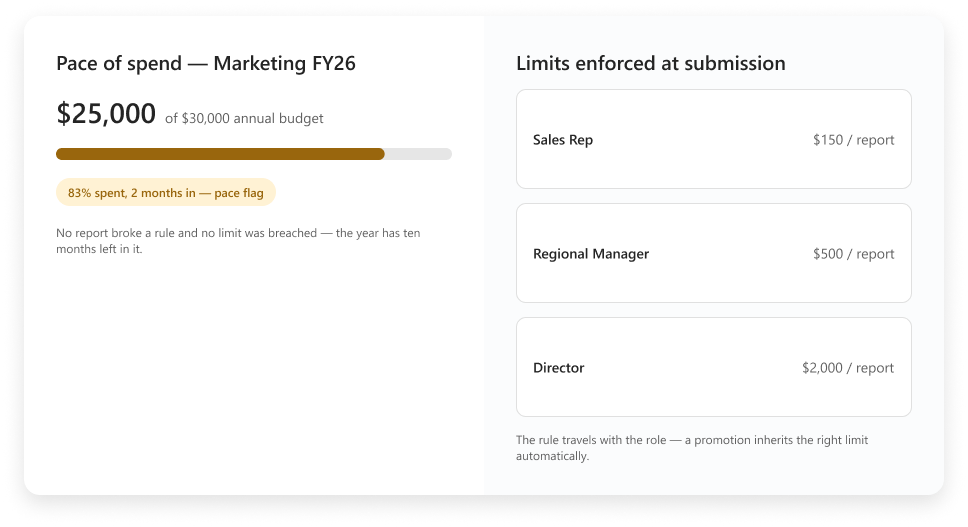
01 / SUBMISSION LIMITS
Limits enforced at submission
Dollar limits are configured per user role and enforced when a report is submitted, not discovered in a review afterwards.
A sales rep, a regional manager and a director can each carry a different ceiling. The rule travels with the role rather than the individual, so a promotion or a new hire inherits the right limit automatically.
ROLE-BASED CONTROL
The limit follows the role
ROLE 01
Sales rep
ROLE 02
Regional manager
ROLE 03
Director
CONTROL
Dollar ceiling
EVENT
Submission check
RESULT
Right limit inherited
02 / BUDGET SCOPE
Budgets by employee, role or department
A budget can be assigned to an employee, to a role or to a department, for a period you define.
A field team might budget per person because travel is personal and constant. A marketing group budgets at department level because spend moves between people and campaigns. A services business budgets by role, so every regional manager carries the same envelope.
Period and amount are set together, so quarterly and annual budgets run side by side without a separate tracker.
THREE ASSIGNMENT LEVELS
Match the budget to how spend is owned
SCOPE 01
Employee
SCOPE 02
Role
SCOPE 03
Department
03 / PACE
Pace of spend in real time
Take an annual budget of $30,000. Two months in, a manager opens the budget view and sees $25,000 already spent. No individual report broke a rule and no limit was breached, but the year has ten months left in it.
That is what watching actual spend against budget in real time is for. Pace is the signal, not any single report.
ILLUSTRATIVE EXAMPLE
Pace reveals risk before a limit breaks
ANNUAL BUDGET
$30,000
ACTUAL SPEND
$25,000
ELAPSED
Two months
REMAINING
Ten months
04 / VIEWS
What the submitter sees, and what the approver sees
The submitter sees whether they are inside their limit, whether the receipt is attached, and whether the report will go through. Per diem overages, disallowed categories and missing required receipts are flagged before the report leaves their hands, and a required receipt will stop a submission outright.
The approver sees the same flags, plus the budget the spend lands against and how much is already committed.
SHARED CONTROL VIEW
The right context at each step
SUBMITTER
Limits, receipts and flags
APPROVER
Flags, budget and committed spend
CONTROL
Required receipt stops submission
YOUR QUESTIONS, ANSWERED
Frequently asked questions
Choose a question to see the answer.
NEXT IN THE FLOW
Next: Automated approval workflows
A budget flag is only as good as the person it reaches.
GET A DEMO
See how teams manage expenses with SutiExpense.
See role-based limits, real-time budget pace and approval context working together in one expense workflow.

