

SUTIEXPENSE / CORPORATE CARDS
Corporate card integration
Card transactions arrive on a daily feed, match to receipts automatically, and pick up your coding before your close opens.
Get a Demo →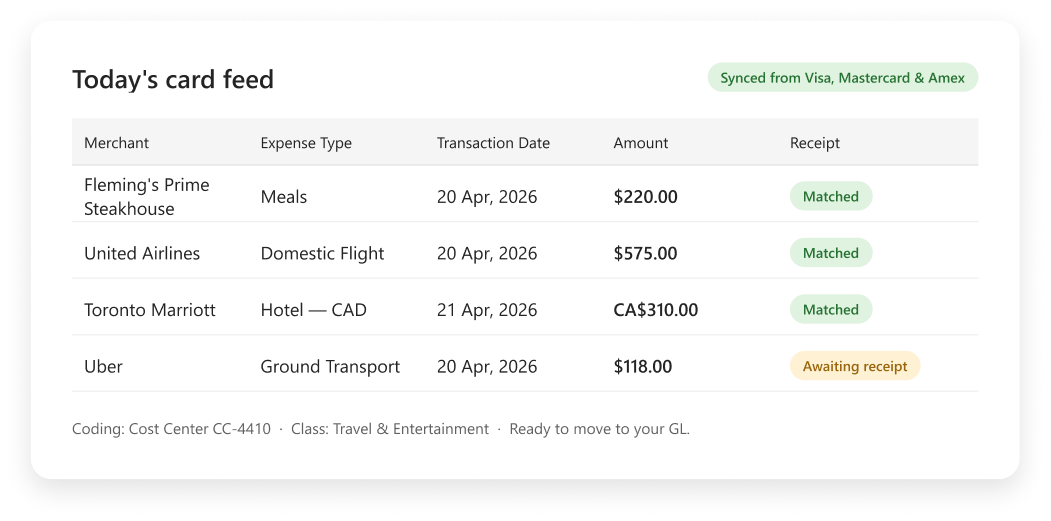
01 / DAILY FEED
Transactions arrive on a daily feed
True corporate card transactions post automatically on a daily feed, from your bank or directly from Visa, Mastercard or Amex. SutiExpense reconciles against that feed, so nobody pairs statement lines to report lines by hand at month end.
The feed is configured once against your card program, and transactions carry into reports as they arrive.
Without a corporate card program, a personal debit or small-business card can be linked with bank credentials, which keeps contractors and small departments on one process.
AT A GLANCE
How the pieces connect
01 / SOURCE
Bank or card network
Corporate card transactions arrive automatically.
02 / FREQUENCY
Daily feed
The configured feed runs without a manual import.
03 / DESTINATION
Expense report
Transactions carry into reports as they arrive.
02 / RECEIPT MATCHING
Receipts and transactions match automatically
A receipt captured by camera, sent by email to receipts@sutisoft.com from a registered address, or uploaded as a scan is read by extraction technology and stored in that person's repository. When the matching card transaction arrives on the feed, the receipt links to it.
AI duplicate detection flags a receipt submitted twice against card transactions before an approver sees it, which is where double reimbursements usually begin.
A submission cannot go through without a required receipt.
AT A GLANCE
How the pieces connect
01 / CAPTURE
Receipt enters
Camera, registered email or uploaded scan.
02 / MATCH
Transaction arrives
The receipt links to its matching card transaction.
03 / CHECK
Submission control
Duplicates and missing required receipts are flagged.
03 / INTERNATIONAL SPEND
Foreign currency card lines
SutiExpense carries the transaction currency through to the report, so submitter and approver see the same figure the card was charged.
Tax runs on location-driven rules your administrator defines per province or country, Canadian GST and PST or European VAT, with a recapture percentage and GL code on each expense category. International per diem structures sit alongside GSA for travel outside the US.
CONTROL VIEW
How the pieces connect
CARD LINE
Transaction currency
The charged figure remains visible in the report.
TAX
Location-driven rules
Province or country rules carry recapture and GL coding.
TRAVEL
International per diem
International structures sit alongside GSA.
04 / ACCOUNTING DATA
Coded card data moves to your accounting system
Coding dimensions cover company, department, cost center, location, project and class. Saved coding preferences pre-populate at user level and flow into the report, so a card line shows up against the cost center that person always charges.
The coded data then moves out to the system your GL sits in.
AT A GLANCE
The complete operating model
DIMENSION 01
Company
DIMENSION 02
Department
DIMENSION 03
Cost center
DIMENSION 04
Location
DIMENSION 05
Project
DIMENSION 06
Class
YOUR QUESTIONS, ANSWERED
Frequently asked questions
Choose a question to see the answer.
NEXT IN THE FLOW
Next: Expense coding and cost centers
Coding is what makes a card line usable in your GL.
GET A DEMO
See how teams manage expenses with SutiExpense.
See the complete expense workflow configured around your team.

