

SUTIEXPENSE / EXPENSE CODING
Expense coding and cost centers
Expenses are coded at entry against your own dimensions, so approved lines arrive carrying the account string your GL expects.
Get a Demo →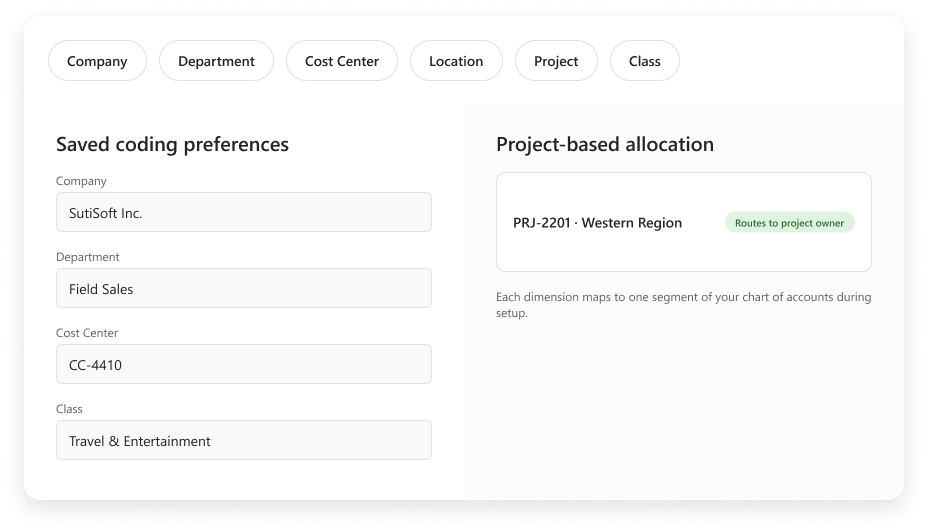
01 / CODING DIMENSIONS
Your GL dimensions are shown and mapped in our system.
You decide which fields are visible, which are required and which stay behind the scenes. A field-services company might use a job and a cost center. A multi-entity group might add company and location before anyone starts a report.
02 / USER DEFAULTS
Coding defaults per submitter
User-level preferences pre-populate the values a person uses most often. Someone assigned to one department and one cost center starts there, then changes a line only when the work is different.
AT A GLANCE
How the pieces connect
START
Saved user preference
APPLY
Pre-populated expense line
CHANGE
Edit only when work differs
03 / PROJECT ALLOCATION
Project is an optional dimension
Project is an optional dimension, not a note someone adds after the fact. Each expense line can carry its project code through the report. Approval routing can follow the project, so the budget owner sees charges before they reach the GL.
CODING FLOW
How the pieces connect
EXPENSE LINE
Captured spend
PROJECT CODE
Optional dimension
PROJECT OWNER
Approval review
GL
Approved coding
04 / CHART OF ACCOUNTS
One-to-one mapping into the GL
Each dimension is mapped one to one to the corresponding chart-of-accounts segment during setup. The approved export then carries the same coding string into the GL.
AT A GLANCE
How the pieces connect
DIMENSION
Configured once
MAPPING
One to one
EXPORT
Expected GL string
YOUR QUESTIONS, ANSWERED
Frequently asked questions
Choose a question to see the answer.
NEXT IN THE FLOW
Next: Tax rules
Once a line is coded, the next question is what tax sits on it.
GET A DEMO
See how teams manage expenses with SutiExpense.
See coding dimensions, project allocation and GL mapping working together in one expense workflow.

