

What is Expense Report Management Software? A Complete Beginner’s Guide
What is Travel and Expense Management Software?
Capture receipts digitally through mobile devices.
Automatically import trip details into expense reports.
Follow pre-defined company spending policies and approval workflows.
With a travel and expense management system, employees can:
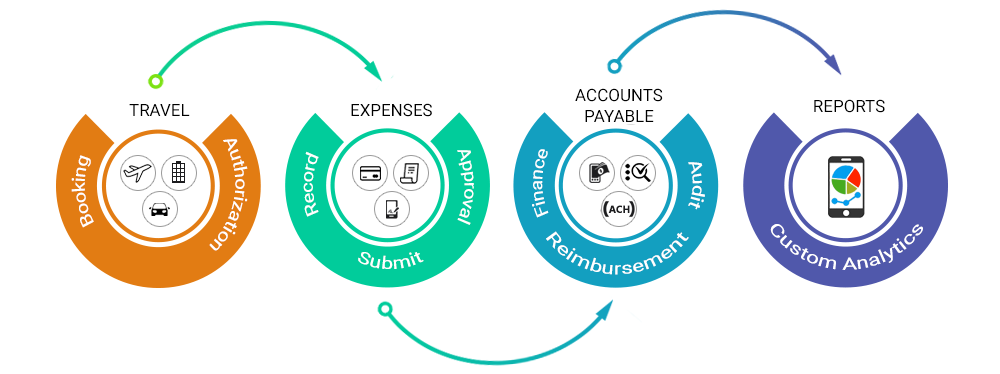
In short, travel and expense management software allows businesses to manage the entire process—from booking travel to expense reimbursement—in a more efficient, transparent, and policy-driven way.
How Does Travel & Expense Management Software Work?
Now the expense reporting and reimbursement is just a 4-step process:

Submit
Take a snap and create expense entries even on the go without having to keep receipts for longer periods.

Process
Quickly process the expense reports with multi-level approval workflows without having the expenses stuck at any point.

Reimburse
Speed up reimbursement process by making payments by check, direct deposit or any other payment gateways.

Analyze
Understand the metrics by charting, sorting and pivoting the expense data to make data-driven decisions.
Why Should Businesses Choose Travel and Expense Reporting Management Software?
Expense reporting in just a click
Receipt management
Mobile app
Credit card integration
A key function of travel and expense management software is ensuring that employee spending follows company guidelines. Organizations can embed their existing travel and expense policies directly into the system, which helps prevent non-compliant claims before they reach the approval stage.
The software can:
Flag or restrict expenses that fall outside policy limits.
Allow employees to justify exceptions with comments when needed.
Support multiple policy structures for different branches, departments, or employee roles.
Compliance in Travel and Expense Management
Looking for Cloud Expense Reporting Software?
Who Uses Travel and Expense Management Software?
Businesses
Midsize Businesses
Large corporations
Key Challenges That Drive Businesses to Choose Automated Expense Solutions
Increased travel costs
Policy enforcement and compliance
Reimbursement delays
Poor visibility and reporting
Errors
Core Functions of Modern Expense Management Solutions

Integrated travel booking
An integrated travel and expense solution allows you and your employees to book and manage itineraries from a centralized platform. Your booking details are pulled into the business expense management solution automatically.

Intelligent voice-based expense capture
Create your expense report by speaking to the app. Leverage intelligent voice-based technology so you don’t have to type anything.

Flexible approval workflows
Define flexible and multi-level approval workflows to automatically route your expense reports to the right managers for approval. Expense management solution allows you to define workflows based on dollar amounts, roles, locations, projects and department heads.

Automated audit intelligence for spend compliance
Comprehensive audit intelligence capabilities allow you to adapt pre-existing business rules for expense categories. This helps prevent unneeded spend, allows deeper insight into each employee and their practices, and helps prevent non-business related expenditures.

Real-time analytics and reports
Intuitive dashboards gives you detailed insights into employee spend through various customizable report formats that help you make informed decisions. Automated reporting capabilities allow you to send PDFs, excel, and other reports without even clicking.

Internal and external app integration
Integrating with both internal and external applications, like an ERP or active directory, enables you get data out of expense system automatically. No manual entry required. This saves the AP team time and money and reduces user error.
How to Choose the Right Expense Management Software for Your Business?
Every business has unique needs when it comes to expense reporting. With a lot of options out there, deciding on the right online expense tracker can be tricky. During the evaluation process, you should consider:
What challenges you want to solve?
Confusing corporate travel policies
Defining too many expense policies restricts employees and may cause confusion. Allowing employees to quickly access relevant policies and information they need enables travelers make bookings complying with the corporate policies.
Clunky spreadsheets & unauthorized bookings
Paper-based methods make the entire process messy and leave no insight into employee spending.
Policy enforcement
Not complying with corporate travel policies in many cases results in maverick spending. Often, employees don’t remember corporate policies or limits and commit out-of-policy spending.
Poor visibility & transparency
You can control spending only when you can see it. Inefficient processes provide no real-time visibility into spending and you’ll have no idea who is spending what and why.
Significant delays in reimbursement cycle times
The manual expense reporting process is cumbersome and requires approvers and accountants to verify and validate the data, resulting in significant reimbursement delays.
Questions to be asked
How employees can submit expense reports?
Can I easily find receipts?
Is your expense reporting process taking too long?
How do you approve expense reports? Is there a formal process?
What improvements need to be made in your expense reporting process?
Evaluate your technology needs
Not all the solutions fit best for your company. It’s wise to evaluate and and choose the one that best meets your needs. Determine your requirements, what problems you want to solve and the type of solution you need. We have outlined few questions that will help you choose the right solution for you:
Questions to be asked
Who uses the solution? Is it just a few employees or a particular department or the entire company?
What other solutions do you need your expense solution to integrate with?
How tech-savvy are your employees? How much training is required?
Do you want the solution to be accessible on mobile devices?
What challenges do you want to solve?
Determine the budget
On-premise and SaaS solutions are two options available in the market today. For on-premise, you have hardware, installation and maintenance costs. The other way is to go with a SaaS solution that ensures your solution will always run on the latest version, without any installation.
| Parameter | SaaS | On-premise |
|---|---|---|
| Cost | Pay as you use model. No hardware and maintenance costs. | Pay for hardware, software and licensing. |
| Deployment | Easy deployment. No installation required. Software updates can be pushed automatically. | Deployment time is longer. Complex setup and IT support is required. |
| Customization | Solution can be easily customized using APIs. | Difficult to customize. |
| Integration | SaaS solutions are built on open-platform architecture and can be easily integrated with other business applications. | Limitations on the data volume and access; lot of administrative work. |
| Hardware | No hardware maintenance, everything is done by the solution provider. | Need to install hardware and maintenance costs are high. |
| Control | Accessibility can be controlled by the provider but data is owned by customer. | Since the solution is installed on the machine, customer can control the systems. |
Consider employee feedback
CFOs are not the only decision makers; considering the opinion of all stakeholders such as travelers, finance department, and employees would help you choose the right software. You have to understand the process every stakeholder undergoes, and address their questions to eliminate the bottlenecks. Ask your employees how they are processing expense reports and what they’d like to improve. CFOs will need to understand where most employees are spending their money and what reporting the company is lacking.
When taking a test drive, make sure at least one member of all user types are involved and gather their feedback on how a particular process can be improved. Consider choosing a solution that works best for all.
Understand the cloud infrastructure
Integration is one parameter that businesses should look for in cloud-based applications. The solution should seamlessly integrate with internal systems and other cloud services. When evaluating a solution, verify if it can integrate with internal and external applications. Evaluate how open the new solution is, what applications the solution can integrate with, and how long the integration will take. Assessing the criteria can help you easily sync data with multiple applications without much data transition.
Ask for security measures
Security is the biggest concern for businesses switching to cloud-based applications. Check with the vendor to see how they are going to store your sensitive data? Evaluate the security measures by reviewing certifications, accreditations and standards of the company. SOC2, ISO27001 and GDPR compliance are various security standards and choosing a vendor complying these standards ensures your data is stored securely.
Examine the technical implementation
Switching to cloud solutions means all the setup, deployment and technical support will be managed by the service provider. When choosing a software vendor, make sure they follow the best practices to manage your project.
News & Articles

Rules-Based Automation vs AI-Driven Expense Automation: Practical Differences

SutiSoft Adds New Capabilities to its Expense Report Software
New Features Add Additional Capabilities to SutiExpense
New Features Further Streamline Expense Reporting Process for Today’s Workforce
Products
Features
Resources

©
SutiSoft, Inc. All Rights Reserved